Glean Custom Connector – Backstop Integration
A global Private Equity firm relies on Backstop as its core CRM and investment operations platform. Bridge IT designed and built a custom Glean connector that surfaces Backstop data directly inside the firm’s enterprise search experience.
Business Context
The challenge of fragmented investment data
The firm's investment team operates across a wide portfolio of funds, relationships, and deals. Backstop serves as the authoritative system of record — housing contact profiles, fund data, meeting notes, investor interactions, and documents built up over years of active relationship management.
As the firm adopted Glean for enterprise search, Backstop remained siloed. Investment professionals searching for a contact, a fund, or the history of a relationship had to context-switch into Backstop rather than finding that information surfaced naturally alongside email, documents, and other enterprise content.
The ask was clear: make Backstop data searchable through Glean without disrupting existing workflows or compromising the access controls already configured in Backstop.
Solution Architecture
How the connector works
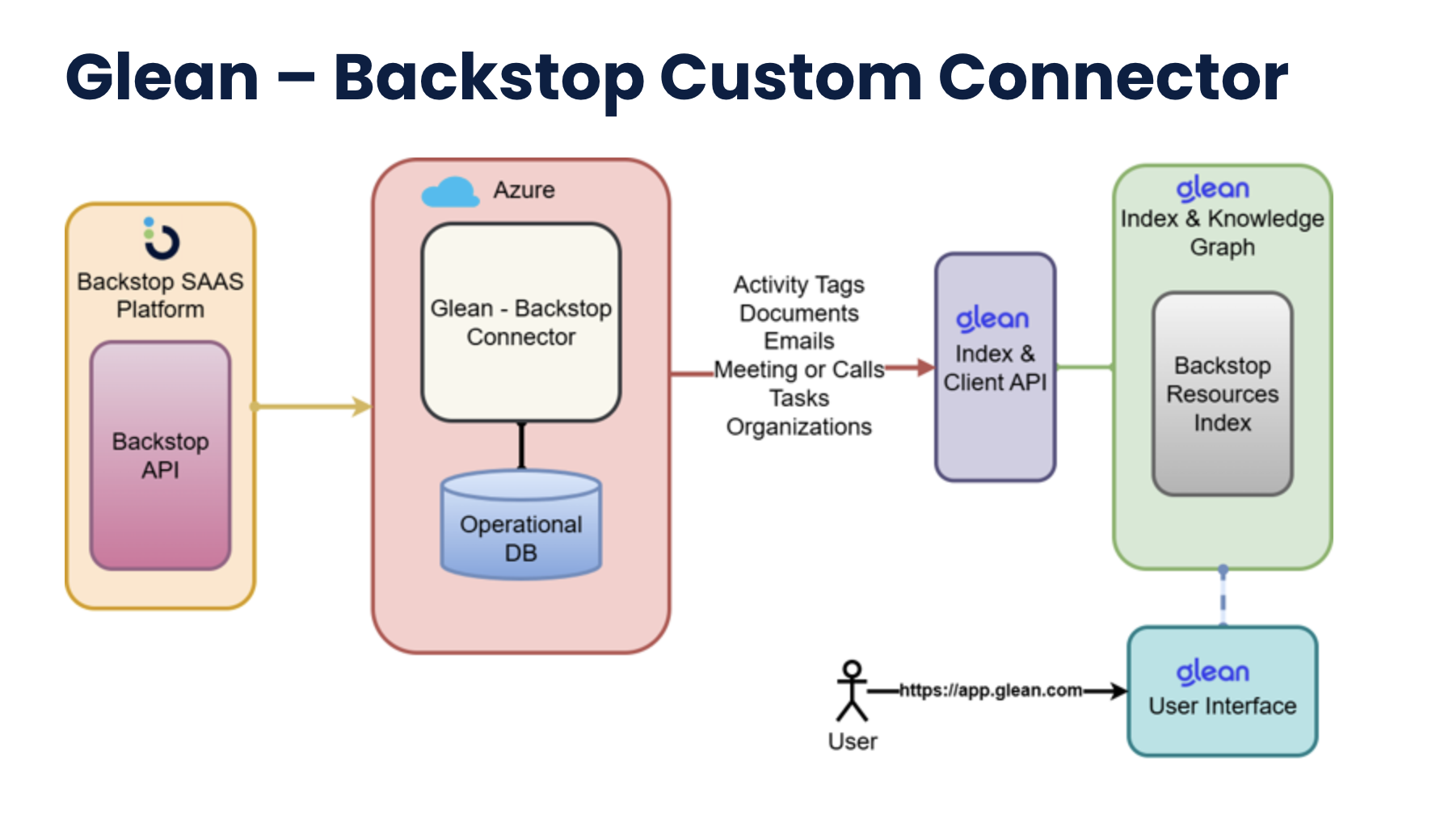
The connector runs on Azure, pulls from the Backstop API, and pushes activity tags, documents, emails, meetings, tasks, and organizations into the Glean Index & Client API — making all Backstop content searchable via app.glean.com.
How we built it
Bridge IT followed a structured delivery approach — from API assessment through production rollout — to ensure a reliable, permission-aware, and maintainable connector.
1
Backstop API Assessment
Mapped the Backstop REST API surface to identify which objects — contacts, funds, notes, interactions, and documents — carried the highest search value for investment professionals.
2
Glean Custom Connector Design
Designed the connector schema to align Backstop data models with Glean's indexing requirements, defining entity types, access controls, and incremental sync cadence.
3
Authentication & Permissions Mapping
Implemented OAuth-based authentication against the Backstop API and mapped Backstop role-based permissions to Glean's document-level ACL model to ensure data remains appropriately scoped.
4
Incremental Sync & Indexing
Built an incremental sync pipeline that detects updates in Backstop and pushes delta changes to the Glean index, keeping search results current without full re-crawls.
5
Testing & Relevance Tuning
Validated search result quality across representative investment queries and tuned entity weighting to prioritize high-value Backstop objects in Glean's ranking model.
6
Rollout & Enablement
Deployed the connector to production and ran enablement sessions with the investment team to demonstrate effective search patterns across the newly integrated data source.
Outcomes
The connector went live with zero changes required to existing Backstop workflows, and delivered immediate value to the investment team from day one.
Search Coverage
Backstop contacts, funds, and interaction history made fully searchable via Glean
Time to Insight
Investment teams surface relevant CRM context in seconds rather than navigating multiple systems
Adoption
Connector deployed across the full investment team with no changes to existing Backstop workflows
Maintainability
Modular connector architecture allows the firm to extend coverage to additional Backstop objects over time
Latest Insights
Expert perspectives, case studies, and thought leadership from the Bridge IT team.
 Security
Posted by Bridge IT Team
November 14, 2025
Securing the Tri-Cloud (AWS, GCP, AZURE)
Helping a multi-cloud enterprise replace a fragmented mix of security tools with a single, unified platform spanning AWS, Azure, and GCP.
 Cloud Strategy
Posted by Bridge IT Team
September 5, 2025
Prisma Cloud’s Cloud Code Security (CCS) capabilities
Helped a cloud-native enterprise finally make shift-left security stick — by bringing security directly into the developer workflow.
 Cloud Strategy
Posted by Bridge IT Team
April 15, 2025
Elevates Cloud Security for Client with Groundbreaking Engagement
Transformed a dormant cloud environment into a fully secured, compliance-ready infrastructure — and uncovered hidden malware in production Kubernetes clusters along the way.
Need a custom connector or integration?
Bridge IT has deep experience building connectors, integrations, and data pipelines that connect enterprise platforms to modern AI-powered tooling.